Grad School Funding Calculator: How to Estimate Your Costs and Close the Gap

Financial wellness often starts with clarity, and understanding how you are paying for graduate school is no exception. Paying for graduate school has always required careful planning, but starting with the 2026–27 academic year, the math changes for many students.
With the elimination of Grad PLUS loans for new borrowers after July 1, 2026, graduate and professional students may have less federal borrowing capacity than in prior years. That can create a “funding gap” between your program’s total cost and what you can cover through federal loans and personal resources.
Ascent’s Grad School Funding Calculator helps you estimate that gap in under a minute. By entering your program length, cost of attendance, expected annual cost increases, and how you plan to pay (federal loans plus cash/scholarships/family support), you can quickly see what you’ll still need to finance.
Below is a quick walkthrough of what changed, what the calculator is doing behind the scenes, and how to use your results to plan your next steps.
What changed with graduate federal loans (starting July 1, 2026)
- Grad PLUS loans are eliminated for new borrowers after July 1, 2026.
- Graduate students are limited to Direct Unsubsidized Loans ($20,500/year for graduate programs and $50,000/year for professional programs) and lifetime caps.
For many students, this means federal loans may no longer cover the full cost of attendance.
This calculator is most useful as a planning tool: it helps you model scenarios before you commit to a program, accept an offer, or decide how much you’ll need to cover with savings, scholarships, employer support, or private student loans.
How to Use the Grad School Funding Calculator
If you’re trying to figure out what grad school might actually cost, and what you’ll need to do to cover the difference, this calculator can help. In a few quick inputs, it estimates your total program cost, how much you may be able to cover with federal Direct Unsubsidized Loans (based on annual limits), and what funding gap could be left.
You can use it whether you’ve already been accepted or you’re still comparing options: Ascent’s Grad School Funding Calculator.
Start by Entering Your Program Details
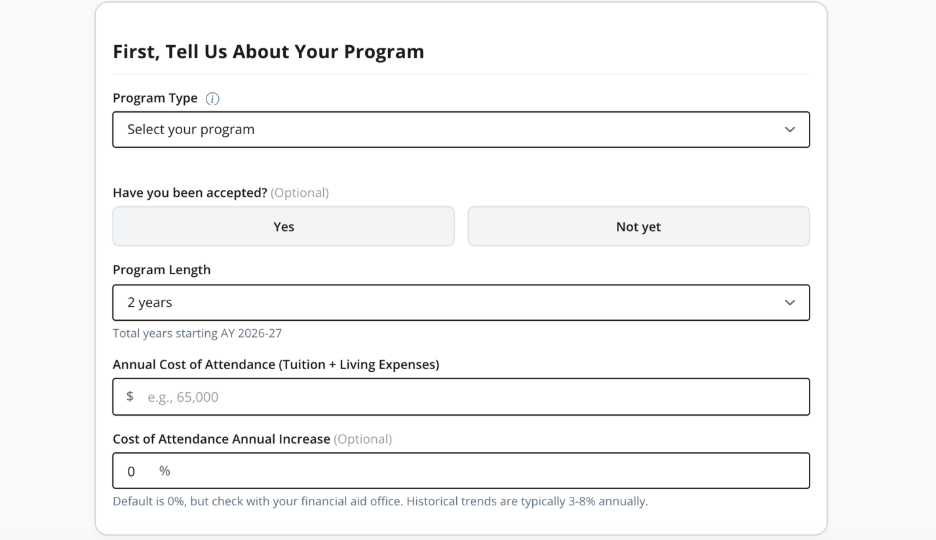
In the first section of the calculator, you’ll enter basic details about your program. The tool uses these inputs to estimate your total multi-year cost and apply the right annual federal loan cap, so the funding gap it shows you is tailored to your situation.
Program type (graduate vs. professional): Start by choosing the type of program you’re planning for. The calculator uses this choice to apply the correct annual federal Direct Unsubsidized Loan limit, because the federal borrowing cap can differ between graduate and professional programs. That annual limit is one of the key pieces the tool uses to estimate how much of your total cost could be covered with federal loans each year.
Have you been accepted? (optional): If you already have an admission offer, choose “Yes.” If you’re still applying, choose “Not yet.” Either way, you can use the calculator—the difference is how precise your inputs can be. If you’re accepted, you can plug in the cost of attendance for that exact school. If you’re not accepted yet, running a few “what if” scenarios can help you compare programs and spot a potential funding gap before you commit.
Program length: Enter how many years you expect to be enrolled (for example, 2 years). The calculator multiplies your annual cost across the number of years (and adjusts for any annual cost increases you enter) to estimate your total program cost—and your total funding needs over time.
Annual cost of attendance (tuition + living expenses): Enter the school’s published cost of attendance for one year (or your best estimate). This is the baseline the calculator uses for your “total cost,” and it typically includes tuition/fees plus housing, food, transportation, books, supplies, and personal expenses.
Cost of attendance annual increase (optional): If you expect costs to rise each year, enter a percentage. The calculator uses this to increase the annual cost in later years (so a 2–4 year program reflects real-world price growth). If you’re not sure, leaving it at 0% gives you a simpler baseline, or your financial aid office may be able to share historical trends.
Choose How You Plan to Pay Each Year
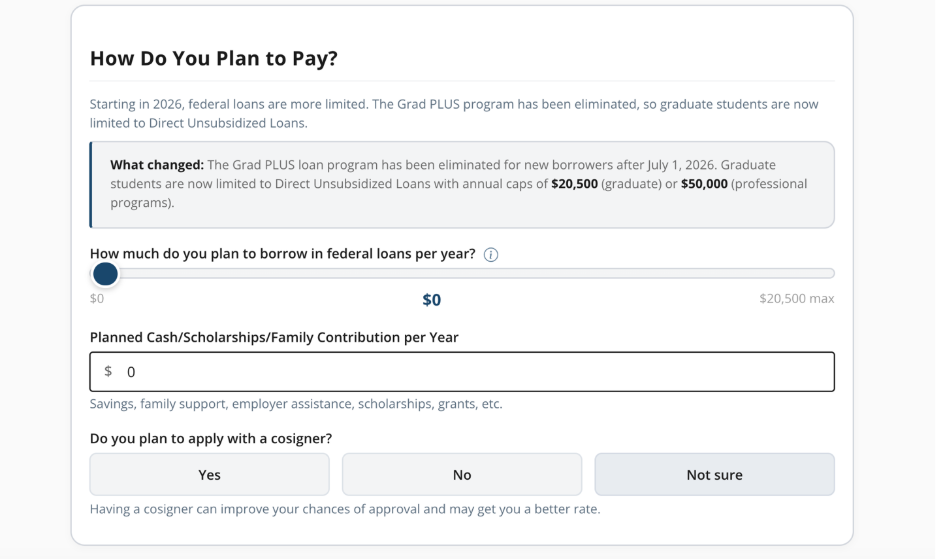
Federal loans per year: Use the slider to select how much you plan to borrow in federal Direct Unsubsidized Loans each year, up to the annual maximum shown for your program type (for many graduate programs, the calculator shows a max of $20,500/year).
Planned cash/scholarships/family contribution per year: Enter any amount you expect to cover without loans—such as scholarships and grants, savings, employer tuition assistance, veteran benefits (if applicable), or support from family.
Calculate Your Funding Gap
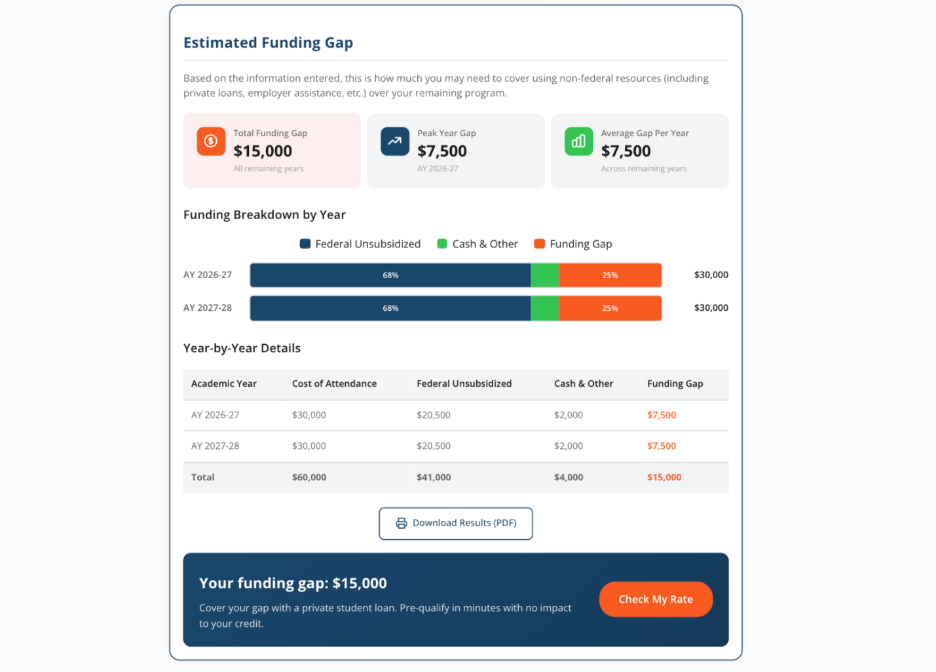
After you click “Calculate My Funding Gap,” the tool adds up your estimated total cost and subtracts the funding you’ve already planned to use, federal Direct Unsubsidized loans and any cash contributions.
Your results break into three clear buckets: your total cost, your planned funding, and your funding gap.
The gap is the most important number to focus on. It shows where you may need to fill in the difference using a combination of options that make sense for your situation.
For some students, that means continuing to look for scholarships or grants, using employer tuition assistance, or adjusting living expenses or program timing. For others, private student loans may be part of the plan, especially when federal borrowing is capped and remaining costs can’t be covered with savings alone.
If private loans are an option you’re considering, applying with a cosigner can help improve access and may lead to more competitive rates. While it’s a personal decision that comes with shared responsibility, it can be one way to make financing feel more manageable.
Exploring these options side by side can help you understand tradeoffs like interest rates, repayment flexibility, and total cost over time.
Ascent Is Here to Help
Paying for graduate school is a major decision, especially as federal loan rules change. Taking time to understand your total costs, identify any funding gap, and compare your options can help you make a more confident choice, before you commit.
Ascent offers resources for students and families offer guidance about paying for school, better budgeting, career-readiness, and more. Amid ongoing student loan changes, Ascent remains committed to empowering student success and financial wellness.